Why Two Laptops With the Same Specs Perform Differently
Two laptops can have identical specs on paper but perform very differently in real life. This guide explains cooling, power limits, tuning, and design choices that affect real-world performance.
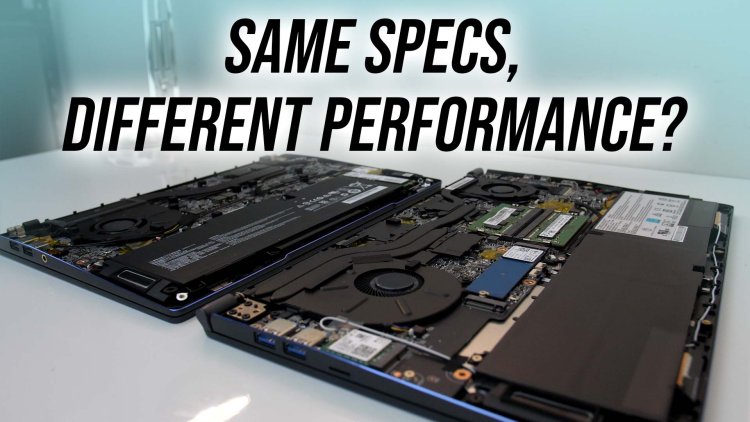
Why Two Laptops With the Same Specs Perform Differently
It is one of the most confusing experiences for laptop buyers: two laptops with the same processor, same RAM, and same GPU, yet one feels faster, runs cooler, and performs better.
The reason is simple — spec sheets do not tell the full story. This guide explains the hidden factors that actually decide real-world laptop performance.
1. Power Limits: The Invisible Performance Wall
Processors and GPUs do not run at a fixed speed all the time. They operate within power limits defined by the laptop manufacturer.
- Short bursts allow high boost clocks
- Sustained loads depend on power limits
- Lower limits = earlier throttling
Two laptops with the same CPU can behave very differently depending on how much power they are allowed to draw over time.
2. Cooling Design Matters More Than Specs
Cooling is the single biggest reason for performance differences.
| Cooling Factor | Impact on Performance |
|---|---|
| Chassis thickness | More space = better heat dissipation |
| Heat pipes / vapor chamber | Improves sustained performance |
| Fan size & tuning | Affects noise and stability |
| Airflow design | Determines thermal throttling |
Thin laptops often throttle earlier to protect components, while thicker laptops can sustain higher performance for longer.
3. GPU Wattage (TGP) Changes Everything
GPU model names alone are misleading. The same GPU can perform very differently depending on wattage.
- Higher TGP = higher sustained FPS
- Lower TGP = quieter, cooler, but slower
This is why two laptops with the same GPU can show dramatically different gaming results.
4. RAM Configuration Can Bottleneck Performance
RAM is not just about capacity.
- Single-channel RAM reduces performance
- Dual-channel RAM improves CPU and GPU throughput
- Soldered RAM limits future upgrades
A laptop with dual-channel memory can outperform another with the same CPU but poor RAM configuration.
5. Storage Speed & Thermal Throttling
Even SSDs can throttle under sustained load.
- Poor SSD cooling reduces speed
- Thermal throttling affects file transfers
- Cheaper SSD controllers reduce consistency
This impacts tasks like video editing, file compression, and large data transfers.
6. Manufacturer Tuning & Firmware
Laptop manufacturers tune performance profiles differently.
- Some favor silent operation
- Some prioritize maximum performance
- Some balance both
Firmware, BIOS settings, and power profiles play a major role in how a laptop behaves day to day.
Real-World Scenarios
| Task | Why Performance Differs |
|---|---|
| Gaming | GPU wattage and cooling |
| Video rendering | CPU power limits |
| Multitasking | RAM speed and channels |
| Battery usage | Efficiency tuning |
How to Avoid Being Misled by Specs
- Check sustained performance reviews
- Look for cooling design details
- Verify RAM configuration
- Understand power limits
- Ignore marketing labels
Final Verdict
Laptop performance is the result of engineering decisions, not just specifications.
Understanding what happens beyond the spec sheet allows you to choose a laptop that performs consistently — not just impresses on paper.
What's Your Reaction?