Mac Studio vs MacBook: Which One Should You Buy & Why (Complete Comparison)
Confused between Mac Studio and MacBook? This detailed guide compares performance, configurations, thermals, portability, and real-world usage to help you choose the right Apple machine.
Mac Studio vs MacBook: Which One Should You Buy?
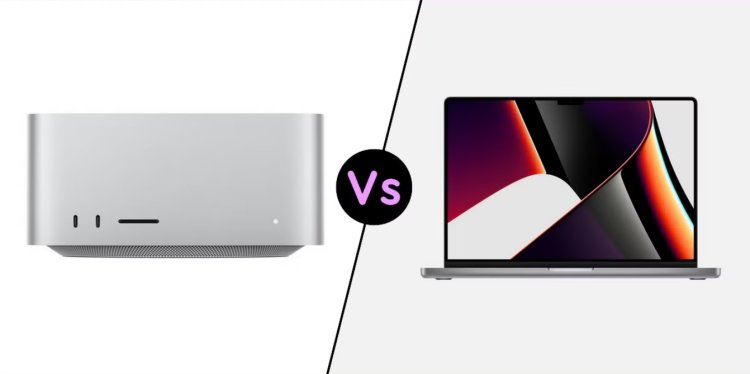
Apple offers two very different types of powerful computers: Mac Studio and MacBook. While both use Apple Silicon, they are built for completely different purposes.
This guide explains the real differences — not marketing — so you can choose the right machine based on how you actually work.
What Is Mac Studio?
Mac Studio is a desktop-class performance machine. It is designed for professionals who need maximum sustained power and do not require portability.
- No display, keyboard, or trackpad included
- Designed to stay plugged in
- Focused on performance, thermals, and expandability
Typical Mac Studio Users
- Video editors (4K / 8K timelines)
- 3D artists & animators
- Music producers
- Developers running heavy workloads
What Is a MacBook?
MacBooks are portable computers designed to balance performance, battery life, and mobility.
- Built-in display and battery
- Works anywhere
- Thermally limited compared to desktops
Typical MacBook Users
- Students & professionals
- Developers on the move
- Creators who travel
- Office and productivity users
Mac Studio vs MacBook: Core Differences
| Feature | Mac Studio | MacBook |
|---|---|---|
| Portability | None (desktop) | High |
| Sustained performance | Excellent | Limited by thermals |
| Cooling | Large active cooling | Compact cooling |
| Battery | No | Yes |
| External display support | Multiple high-res displays | Limited by model |
Configuration Comparison (Apple Silicon)
Mac Studio Configuration Options
- M2 Max / M2 Ultra (or newer equivalents)
- Up to 192 GB unified memory
- Up to 8 TB SSD
- Higher sustained GPU performance
MacBook Configuration Options
- M3 / M3 Pro / M3 Max
- Up to 128 GB unified memory (model-dependent)
- Up to 8 TB SSD
- Performance drops under long heavy load
Real-World Performance Differences
Where Mac Studio Wins
- Long video renders
- 3D rendering & simulations
- Multi-hour workloads
- Thermal stability
Where MacBook Wins
- Portability
- Battery-powered work
- Short burst workloads
- Travel-friendly workflows
Which One Should YOU Buy?
Buy Mac Studio If:
- You work at a desk most of the time
- Your workloads are heavy and continuous
- You need multiple external monitors
- Performance matters more than mobility
Buy MacBook If:
- You work from multiple locations
- You need a battery-powered machine
- Your workloads are mixed or moderate
- You value flexibility
Cost Consideration
While Mac Studio may look expensive, remember: you are paying only for the computer — not a display or battery.
A fully configured MacBook can easily approach Mac Studio pricing while delivering lower sustained performance.
Final Verdict
There is no universal winner between Mac Studio and MacBook. The right choice depends entirely on how and where you work.
If performance is your job, choose Mac Studio. If flexibility is your lifestyle, choose MacBook.
What's Your Reaction?