SSD Types Explained: SATA vs NVMe Gen3 vs NVMe Gen4 — What’s the Real Difference?
Confused between SATA SSD, NVMe Gen3, and NVMe Gen4? This detailed guide explains speed differences, real-world performance, heat, pricing, and helps you choose the right SSD for your laptop or PC.
SSD Types Explained: SATA vs NVMe Gen3 vs NVMe Gen4 — What’s the Real Difference?
Solid State Drives (SSDs) have become standard in modern laptops and desktops. But not all SSDs are equal. SATA, NVMe Gen3, and NVMe Gen4 differ massively in speed, price, heat generation, and real-world usefulness.
This guide explains what those differences actually mean — beyond marketing numbers — so you can make a smarter buying decision.
Why SSD Type Matters
The SSD affects:
- Boot time
- App loading speed
- File transfer performance
- Video editing and large workloads
- System responsiveness over time
Two laptops with the same processor and RAM can feel completely different depending on the SSD type.
Quick Comparison: SATA vs NVMe Gen3 vs NVMe Gen4
| Feature | SATA SSD | NVMe Gen3 | NVMe Gen4 |
|---|---|---|---|
| Interface | SATA III | PCIe 3.0 | PCIe 4.0 |
| Typical Speed | 500–550 MB/s | 2,000–3,500 MB/s | 5,000–7,000 MB/s |
| Boot & App Load | Good | Very Fast | Extremely Fast |
| Heat | Low | Moderate | High |
| Price | Cheapest | Balanced | Most Expensive |
SATA SSD Explained
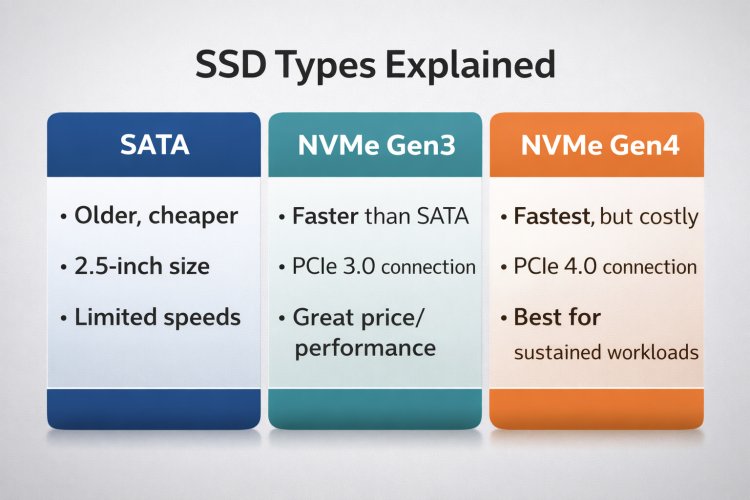
SATA SSDs were the first major upgrade over traditional hard drives. They are limited by the SATA interface, not by the storage itself. Advantages:
- Affordable
- Cool and stable
- Huge upgrade over HDDs
- Speed capped by SATA interface
- Slower file transfers
For basic tasks like browsing, office work, and casual usage, SATA SSDs still feel fast compared to HDDs.
NVMe Gen3 Explained
NVMe Gen3 SSDs connect directly to the PCIe bus, allowing much higher speeds than SATA SSDs. Advantages:
- Massive speed improvement
- Excellent price-to-performance
- Noticeably faster multitasking
- More heat than SATA
- Benefits depend on workload
For most users, NVMe Gen3 is the best balance between cost and performance.
NVMe Gen4 Explained
NVMe Gen4 SSDs double the bandwidth of Gen3, offering extremely high speeds. However, those speeds are only noticeable in specific workloads. Advantages:
- Extremely fast file transfers
- Best for professional workloads
- Higher cost
- Runs hotter
- Minimal benefit for everyday tasks
Gen4 SSDs shine in video editing, large data processing, and professional content creation.
Real-World Performance Differences
In daily usage like booting Windows or opening apps, the difference between Gen3 and Gen4 is often barely noticeable.
- Boot time: SATA → NVMe feels big, Gen3 → Gen4 feels minor
- Gaming: Load times improve slightly with NVMe
- Editing: Gen4 helps with large files
This is why marketing numbers can be misleading if you don’t match them to your workload.
Heat, Throttling & Laptop Constraints
High-speed NVMe Gen4 SSDs generate more heat. In thin laptops, this can lead to throttling where the SSD slows itself down.
In many laptops, a good NVMe Gen3 SSD actually performs more consistently than a poorly cooled Gen4 drive.
Which SSD Should YOU Choose?
| User Type | Recommended SSD |
|---|---|
| Students & Office Users | SATA or NVMe Gen3 |
| Developers & Power Users | NVMe Gen3 |
| Creators & Editors | NVMe Gen4 |
| Best Value Seekers | NVMe Gen3 |
Final Verdict
Upgrading from HDD to any SSD is a massive improvement. Upgrading from SATA to NVMe Gen3 is noticeable. Upgrading from NVMe Gen3 to Gen4 is workload-dependent.
For most users, NVMe Gen3 offers the best balance of speed, heat, and cost. Choose Gen4 only if your work truly benefits from it.
What's Your Reaction?