Laptop Processor Suffixes Explained: U vs H vs HS vs HX — What Should You Buy?
Confused by processor suffixes like U, H, HS, HX, and P? This detailed guide explains what they actually mean, how they affect performance, battery life, and heat, and which one you should choose before buying a laptop.
Laptop Processor Suffixes Explained: U vs H vs HS vs HX — What Should You Buy?
Many laptop buyers focus only on the processor name — Core i5, Core i7, Ryzen 5, Ryzen 7. But the suffix at the end of the processor name is often more important than the number itself.
A Core i5-U and a Core i5-H are completely different CPUs, even though they share the same name. Understanding these suffixes can save you from buying the wrong laptop.
Why Processor Suffixes Matter
Processor suffixes indicate how the CPU is designed to behave:
- Power consumption
- Performance level
- Heat generation
- Battery life
- Laptop thickness and cooling
Ignoring suffixes is one of the biggest reasons people feel their new laptop is “slow” or “overheats”.
Common Intel & AMD Processor Suffixes
| Suffix | Power Class | Main Focus |
|---|---|---|
| U | Low Power | Battery life & efficiency |
| P | Medium Power | Balanced performance |
| H | High Power | Maximum performance |
| HS | Optimized High Power | Performance with better efficiency |
| HX | Extreme Power | Desktop-class performance |
U-Series Processors (Efficiency First)
U-series processors are designed for thin and light laptops. They consume less power and generate less heat. Best for:
- Students
- Office work
- Browsing, documents, meetings
- Travel-friendly laptops
- Lower sustained performance
- Not ideal for heavy workloads
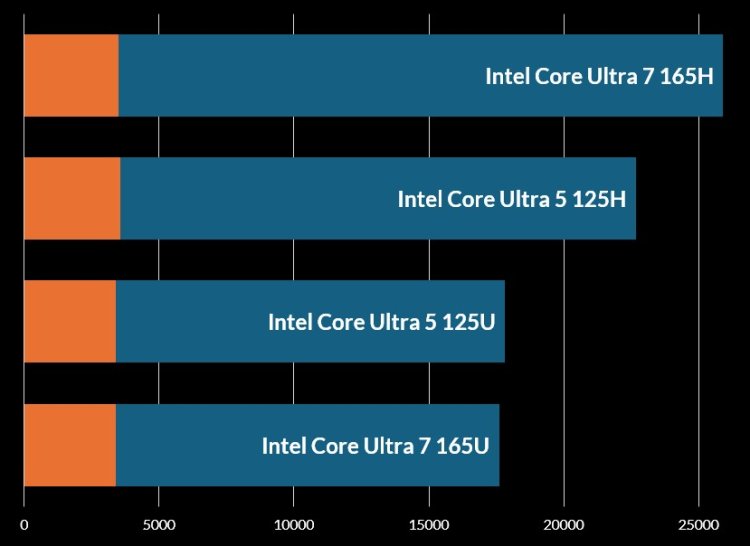
A Ryzen 5 U-series can easily outperform an older Core i7-U in daily tasks — generation matters too.
P-Series Processors (Balanced Option)
P-series processors sit between U and H. They offer more performance than U-series without the heat of H-series. Best for:
- Professionals
- Light content creation
- Developers
P-series CPUs are common in premium ultrabooks and business laptops.
H-Series Processors (Performance Focused)
H-series processors are built for performance. They draw significantly more power and require proper cooling. Best for:
- Gaming laptops
- Video editing
- 3D work
- Heavy multitasking
- Lower battery life
- More heat and fan noise
An i5-H or Ryzen 5-H will outperform a U-series chip by a large margin under sustained load.
HS-Series Processors (Smart Performance)
HS-series processors are optimized high-performance chips. They offer near H-series performance but with better efficiency. Best for:
- Thin gaming laptops
- Creators who need power without extreme heat
HS CPUs are often found in well-engineered premium laptops.
HX-Series Processors (Desktop-Class)
HX-series CPUs are essentially desktop processors inside laptops. They are designed for maximum power, not portability. Best for:
- Professional creators
- Engineers
- Workstations
- Students
- Office users
- Battery-focused buyers
Common Buying Mistakes
- Buying i7-U thinking it is faster than i5-H
- Ignoring cooling quality
- Choosing performance CPUs for travel laptops
- Overpaying for power you will never use
Which Processor Suffix Should YOU Choose?
| Your Usage | Recommended Suffix |
|---|---|
| Office, Study, Travel | U |
| Professional work | P or HS |
| Gaming & Editing | H or HS |
| Workstation tasks | HX |
Final Verdict
Processor suffixes are not marketing decorations — they define how your laptop behaves. Choosing the right suffix matters more than chasing higher model numbers.
Buy based on your usage, not the biggest number on the box. A well-matched processor will feel faster, cooler, and last longer.
What's Your Reaction?